> ## Documentation Index
> Fetch the complete documentation index at: https://docs.screenshothis.com/llms.txt
> Use this file to discover all available pages before exploring further.
# Screenshot API for Modern Applications
> Generate beautiful screenshots programmatically with a single API call.
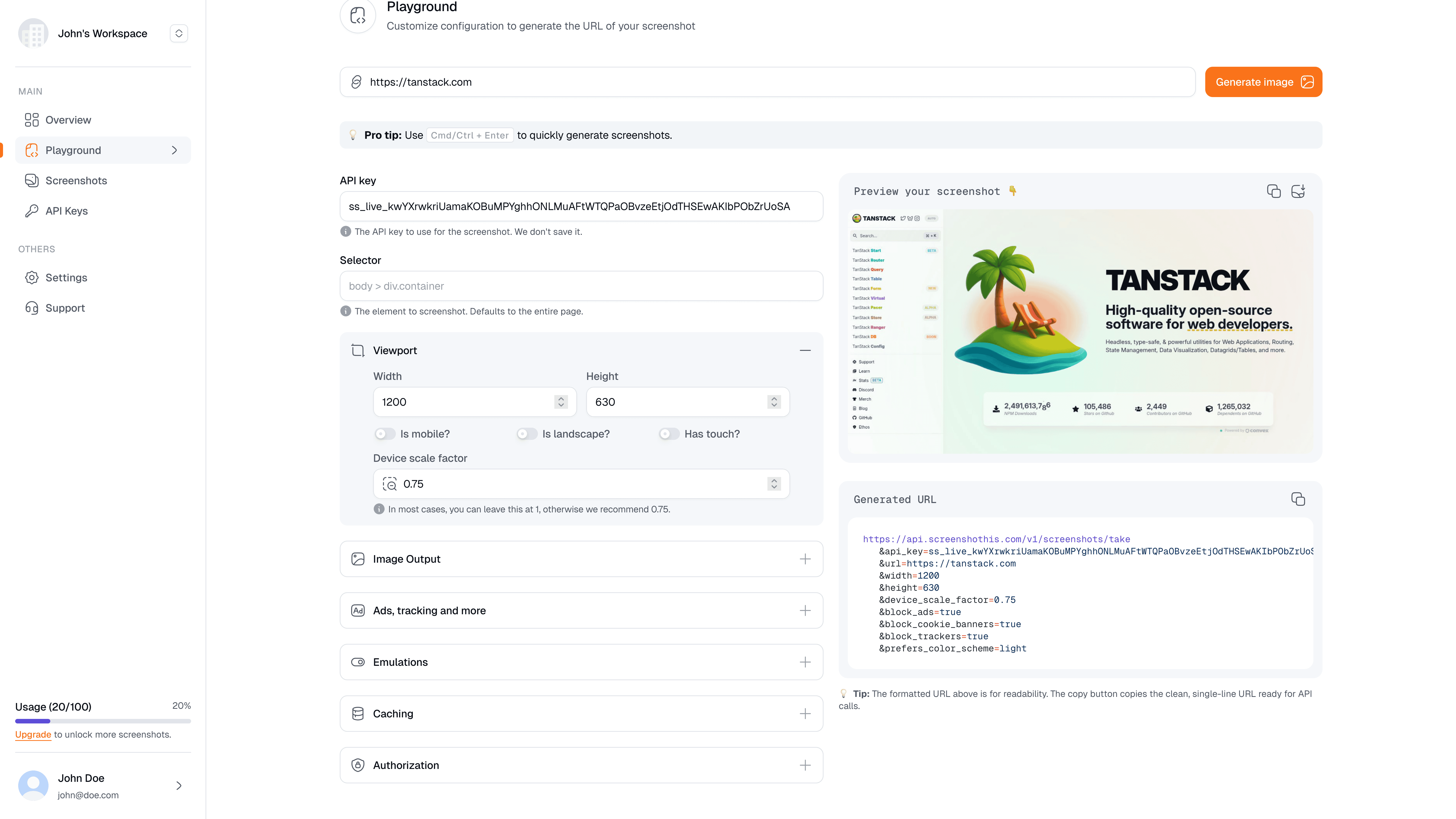
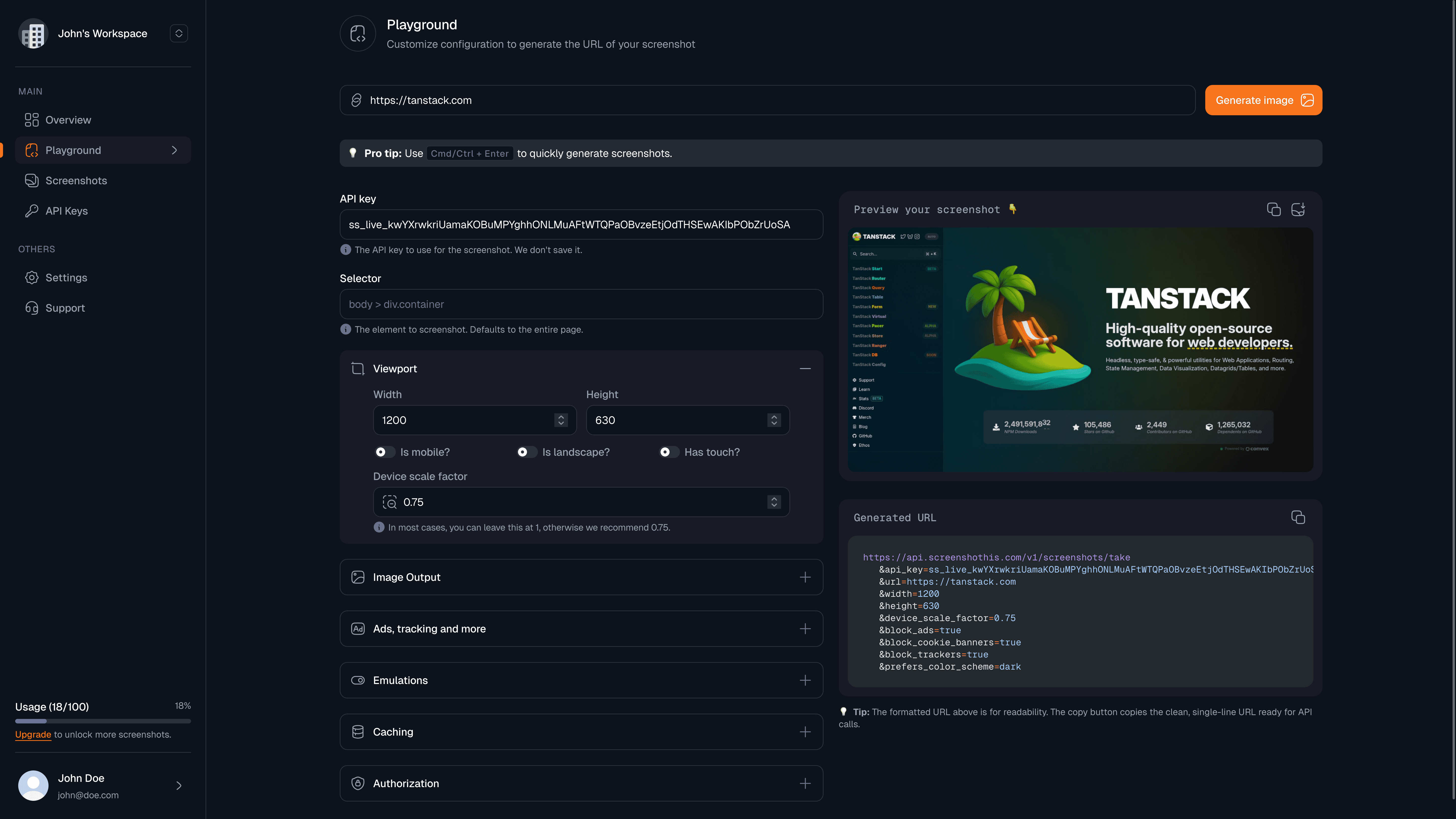 Generate beautiful, high-resolution screenshots of any web page with a single HTTP request. You get lightning-fast Chromium rendering, automatic high-DPI output, and flexible customization options—perfect for social cards, link previews, automated testing, and visual content generation.
## Why developers choose Screenshothis
Get screenshots in under 2 seconds with optimized Chromium rendering
Automatic high-DPI output up to 4K resolution with crisp, clear images
Custom viewports, device emulation, content blocking, and dark mode support
Built-in rate limiting, authentication, and horizontal scaling
## Get started in under 2 minutes
Sign up for free at [screenshothis.com](https://screenshothis.com/register) and create your API key. You'll get 100 free screenshots per month.
```bash theme={null}
curl "https://api.screenshothis.com/v1/screenshots/take?api_key=your_api_key&url=https://github.com" \
-o screenshot.jpeg
```
Your screenshot saves as `screenshot.jpeg` in the current directory
Add parameters to control the output:
```bash theme={null}
curl "https://api.screenshothis.com/v1/screenshots/take" \
-G \
-d "api_key=your_api_key" \
-d "url=https://github.com" \
-d "format=webp" \
-d "quality=90" \
-d "width=1920" \
-d "height=1080" \
-d "block_ads=true" \
-d "block_cookie_banners=true" \
-d "prefers_color_scheme=dark" \
-o screenshot.webp
```
Use WebP format for smaller file sizes while maintaining excellent quality
## Popular use cases
Generate dynamic `og:image` tags for better social sharing:
```bash theme={null}
curl "https://api.screenshothis.com/v1/screenshots/take" \
-d "api_key=your_api_key" \
-d "url=https://yourblog.com/post" \
-d "width=1200" \
-d "height=630"
```
Perfect dimensions for Twitter, LinkedIn, and Facebook cards
Create thumbnails for dashboards, newsletters, or link previews:
```bash theme={null}
curl "https://api.screenshothis.com/v1/screenshots/take" \
-d "api_key=your_api_key" \
-d "url=https://example.com" \
-d "width=400" \
-d "height=300" \
-d "format=webp"
```
Capture screenshots for visual regression testing in CI pipelines:
```bash theme={null}
curl "https://api.screenshothis.com/v1/screenshots/take" \
-d "api_key=your_api_key" \
-d "url=https://yourapp.com/component" \
-d "selector=#main-component" \
-d "format=png" \
-d "block_resources=script,stylesheet" \
-d "prefers_reduced_motion=reduce"
```
Ideal for automated testing and quality assurance workflows
## Continue your journey
Follow our step-by-step guide to master the API in 5 minutes
Explore all available parameters and response formats
Use our official TypeScript SDK for seamless integration
Run Screenshothis on your own infrastructure
## Open source and community-driven
Screenshothis is **open source** (AGPL-3.0) because we believe in transparency and community collaboration. You can:
* ⭐ **Star us on [GitHub](https://github.com/screenshothis/screenshothis)** to show your support
* 🐛 **Report issues** or **request features** in our [Issues](https://github.com/screenshothis/screenshothis/issues)
* 🤝 **Contribute** improvements, bug fixes, or new features
* 🏠 **Self-host** on your own infrastructure for complete control
By keeping our code open, you can see exactly how your screenshots are generated, contribute enhancements, and run your own instance if needed
***
© Screenshothis • AGPL-3.0
Generate beautiful, high-resolution screenshots of any web page with a single HTTP request. You get lightning-fast Chromium rendering, automatic high-DPI output, and flexible customization options—perfect for social cards, link previews, automated testing, and visual content generation.
## Why developers choose Screenshothis
Get screenshots in under 2 seconds with optimized Chromium rendering
Automatic high-DPI output up to 4K resolution with crisp, clear images
Custom viewports, device emulation, content blocking, and dark mode support
Built-in rate limiting, authentication, and horizontal scaling
## Get started in under 2 minutes
Sign up for free at [screenshothis.com](https://screenshothis.com/register) and create your API key. You'll get 100 free screenshots per month.
```bash theme={null}
curl "https://api.screenshothis.com/v1/screenshots/take?api_key=your_api_key&url=https://github.com" \
-o screenshot.jpeg
```
Your screenshot saves as `screenshot.jpeg` in the current directory
Add parameters to control the output:
```bash theme={null}
curl "https://api.screenshothis.com/v1/screenshots/take" \
-G \
-d "api_key=your_api_key" \
-d "url=https://github.com" \
-d "format=webp" \
-d "quality=90" \
-d "width=1920" \
-d "height=1080" \
-d "block_ads=true" \
-d "block_cookie_banners=true" \
-d "prefers_color_scheme=dark" \
-o screenshot.webp
```
Use WebP format for smaller file sizes while maintaining excellent quality
## Popular use cases
Generate dynamic `og:image` tags for better social sharing:
```bash theme={null}
curl "https://api.screenshothis.com/v1/screenshots/take" \
-d "api_key=your_api_key" \
-d "url=https://yourblog.com/post" \
-d "width=1200" \
-d "height=630"
```
Perfect dimensions for Twitter, LinkedIn, and Facebook cards
Create thumbnails for dashboards, newsletters, or link previews:
```bash theme={null}
curl "https://api.screenshothis.com/v1/screenshots/take" \
-d "api_key=your_api_key" \
-d "url=https://example.com" \
-d "width=400" \
-d "height=300" \
-d "format=webp"
```
Capture screenshots for visual regression testing in CI pipelines:
```bash theme={null}
curl "https://api.screenshothis.com/v1/screenshots/take" \
-d "api_key=your_api_key" \
-d "url=https://yourapp.com/component" \
-d "selector=#main-component" \
-d "format=png" \
-d "block_resources=script,stylesheet" \
-d "prefers_reduced_motion=reduce"
```
Ideal for automated testing and quality assurance workflows
## Continue your journey
Follow our step-by-step guide to master the API in 5 minutes
Explore all available parameters and response formats
Use our official TypeScript SDK for seamless integration
Run Screenshothis on your own infrastructure
## Open source and community-driven
Screenshothis is **open source** (AGPL-3.0) because we believe in transparency and community collaboration. You can:
* ⭐ **Star us on [GitHub](https://github.com/screenshothis/screenshothis)** to show your support
* 🐛 **Report issues** or **request features** in our [Issues](https://github.com/screenshothis/screenshothis/issues)
* 🤝 **Contribute** improvements, bug fixes, or new features
* 🏠 **Self-host** on your own infrastructure for complete control
By keeping our code open, you can see exactly how your screenshots are generated, contribute enhancements, and run your own instance if needed
***
© Screenshothis • AGPL-3.0